
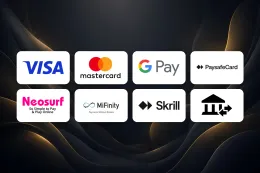

Making a deposit at Clubhouse Casino comes down to logging in, opening the cashier and choosing one of the payment methods. The steps above show the sequence, and the table shows which methods work for deposits.
Before you start, decide on the amount and have your chosen method to hand, whether that is a card, an e-wallet, a prepaid voucher or a crypto wallet. Keep your identity documents within reach as well, because the casino requires identity checks. The sections below cover what stands behind the steps, what to do when a payment fails and how to keep your account safe.
What stands behind the deposit steps

A deposit is more than a payment. The casino asks you to be 18 or over, and identity checks are required, so the account has to be in your own name. The documents involved are Government-issued photo ID, Proof of address and Proof of payment method. These checks are part of the process, and the verification guide explains how they work.
The payment methods are Visa, Mastercard, Maestro, Google Pay, Paysafecard, Neosurf, MiFinity, Skrill, Bank transfer, Bitcoin, Ethereum, Tether (USDT), Bitcoin Cash, Tron and Cardano. They fall into groups that behave differently, so it helps to know the main ones:
- Cards and Google Pay run through your bank, so your bank's own security checks may apply.
- E-wallets and prepaid vouchers sit between your bank and the casino. A voucher is bought separately beforehand.
- Crypto payments are sent from a wallet, and they depend on choosing the right coin and network. A transfer sent on the wrong network may not arrive, so check both before you confirm.
Not every method works in both directions. The table above has a deposit column and a withdrawal column for each one, so look at both before you pick a method. Use a payment method that is in your own name.
Choose a method that suits both directions where you can. Because the table shows deposit and withdrawal separately, a method that works for both saves you from switching later. Any fee charged by your own bank, card issuer or wallet is set by them, so check their terms before you pay.
Support is available by live chat and by email, and there is no phone line. Support hours are 24/7, which is useful to know if a payment needs attention.
18+ · T&Cs apply
When a deposit does not go through

Most deposit problems come from a small number of causes. Work through them in order before you try again.
The payment is declined. Check the details you typed, the balance or limit on the card or wallet, and whether your bank blocks gambling payments. A second attempt with the same details rarely changes the result. Try another method from the table, or contact your bank.
The amount has left your account but does not show. Keep the receipt or transaction reference, and contact support with it. Do not make a second payment while the first is unresolved, because two payments add up.
Crypto is slow or missing. Check that you chose the right coin and network, and look up the transaction on the relevant block explorer. Send the transaction reference to support.
A document is rejected. Photos that are cut off, blurry or dark are the usual reason. Take a new one in good light, with all four corners visible, and make sure the name matches your account. The documents involved are Government-issued photo ID, Proof of address and Proof of payment method.
The method you want is not available for deposits. The table above has the answer: if it shows No for deposits, choose another method from the list.
The payment shows as pending. Wait for the status to change before you try again, and keep the reference. Repeating a payment that is still pending can lead to paying twice.
You cannot log in. Check the web address, then use the website's password reset if it offers one. The login guide covers the usual causes.
When you need support, use live chat or email; there is no phone line. Support hours are 24/7. Include your account name, the payment method, the date and the amount, but never include your password.
Keeping your account safe

Enter your password only on Clubhouse Casino's own website. A message, advert or link that sends you to a page asking for your password or card details is not the casino, so go to the website yourself instead of following it.
If the account offers deposit limits, set one before you deposit. A limit decides in advance how much you can pay in, so the decision is not left to the moment. The safer gambling page explains these tools in general.
Keep your documents ready as clear scans or photos. Avoid depositing from a shared device or over public Wi-Fi, and log out when you finish.
Before you confirm a payment, run through a short checklist:
- The amount is the one you decided on in advance.
- The method is the one you meant to choose and is in your own name.
- You are on the casino's own website and logged in to your own account.
- Nobody is watching the screen or the keyboard.
Finally, keep a note of what you have deposited. Gambling is entertainment that costs money, and your statements are the clearest record of it.